
Settings
Settings reference
A task-oriented directory of the current settings, their effects and persistence scope.
Applies to 0.71 development preview · English guide
General
The exact value shown in the app is the saved value for this installation. Availability depends on permissions and the source.
| Setting and path | What it does | Scope and default |
|---|---|---|
| App languageSettings > General | Choose System, English or Deutsch. This changes app labels, not provider titles or programme text. | Device selection; System is the initial automatic option. |
| Startup screenSettings > General | Choose the guide, groups, player, films, series or previous area when available. | Shared device configuration; initial screen is the guide. |
| Play last channel on startupSettings > General | Start playback automatically only when enabled and the channel remains permitted. | Shared device configuration; initially off. |
| Channel switch delaySettings > General | Coalesce rapid directional-key zaps before opening the selected stream. | Shared configuration on this device; this label alone is not a claim that Sync carries the key. |
| Keep Live TV while browsingSettings > General | Continue the existing live player in the in-app preview when permitted. Disabling it stops that browsing playback. | Shared configuration on this device; this label alone is not a claim that Sync carries the key. |
| Modern phone layoutSettings > General | Use compact phone navigation with a direct Settings action; disable it to restore the previous phone chrome. | Device-local; initially enabled for small touch windows. Tablet layouts keep their existing presentation. |
| Double-tap to seekSettings > General | Enable the optional player double-tap gesture. Ordinary controls and Android Back remain available. | Local to this playback device; do not copy hardware choices between unlike devices. |
Sources
The exact value shown in the app is the saved value for this installation. Availability depends on permissions and the source.
| Setting and path | What it does | Scope and default |
|---|---|---|
| Manage sourcesSettings > Sources | Update the existing source connection rather than creating a replacement source. A verified same-account edit keeps the prepared catalogue and personal rules. | Selected source or its library; personal selection and playback remain separate. |
| Add sourceSettings > Sources | Run the first setup for another supported source. Select the content areas before importing. | Shared configuration on this device; this label alone is not a claim that Sync carries the key. |
| Activate / DeactivateSettings > Sources | Control whether an existing source participates. This differs from deleting its configuration. | Selected source or its library; personal selection and playback remain separate. |
| Remove sourceSettings > Sources | Deliberately remove that source. Read the confirmation and keep a backup if it may be needed again. | Selected source or its library; personal selection and playback remain separate. |
| Update current sourceSettings > Sources | Request a manual refresh of the selected source or configured sources. This is separate from an address edit. | Selected source or its library; personal selection and playback remain separate. |
| Update all sourcesSettings > Sources | Request a manual refresh of the selected source or configured sources. This is separate from an address edit. | Selected source or its library; personal selection and playback remain separate. |
| Source updatesSettings > Sources | Choose the shared schedule and per-source overrides, including interval and update-on-start behaviour. Ordinary refreshes run while the app is open. | Selected source or its library; personal selection and playback remain separate. |
| Source orderSettings > Sources | Use the original order or a name order without changing source identity. | Shared configuration on this device; this label alone is not a claim that Sync carries the key. |
| Recording destinationSettings > Sources | For supported server sources, distinguish local recording from a server-side DVR request. | Selected source or its library; personal selection and playback remain separate. |
| Playlist updatesSettings > Sources | Choose periodic and on-start updates for sources. Per-source choices may inherit or override the general policy. Ordinary automatic work is active only while TiviNerd is open; scheduled recordings remain separate. | Source policy; available intervals are shown by the app. |
| Dispatcharr updatesSettings > Sources | Configure native Dispatcharr update/events behaviour separately from an ordinary playlist refresh. Only capabilities actually available to the account are used. | Dispatcharr source; server and account capabilities apply. |
| Source order on this deviceSettings > Appearance | Change the presentation order of saved sources without changing their identity or channel/category rules. | Device-local presentation. |
EPG
The exact value shown in the app is the saved value for this installation. Availability depends on permissions and the source.
| Setting and path | What it does | Scope and default |
|---|---|---|
| EPG future daysSettings > EPG | Set how far ahead programme entries are retained. It cannot create guide data not supplied by the source. | Shared configuration on this device; this label alone is not a claim that Sync carries the key. |
| Past programsSettings > EPG | Choose how much past guide information to retain; guide history alone does not create provider catch-up. | Shared configuration on this device; this label alone is not a claim that Sync carries the key. |
| EPG update intervalSettings > EPG | Choose manual/no scheduled interval or a periodic refresh while the app is active. | Shared configuration on this device; this label alone is not a claim that Sync carries the key. |
| Update on app startupSettings > EPG | Request a guide refresh on entering the app, independently of the periodic interval. | Shared configuration; initially off. |
| Update when selecting a sourceSettings > EPG | Optionally refresh on selecting a source; it is not a full source-setup command. | Shared configuration; initially off. |
| Available EPG dataSettings > EPG | Inspect saved coverage and update time, including stale/error conditions. | Selected source or its library; personal selection and playback remain separate. |
| Programme guide sourcesSettings > EPG | Manage named shared XMLTV definitions, their addresses, guide offsets and where they are used. | Shared configuration on this device; this label alone is not a claim that Sync carries the key. |
| Source guide assignments / prioritySettings > EPG | Choose saved guides for one source and order them. The first unambiguous match is used. | Selected source or its library; personal selection and playback remain separate. |
| Map channelsSettings > EPG | Search, preview and explicitly assign a guide channel; Automatic and No EPG have distinct meanings. | Selected source or its library; personal selection and playback remain separate. |
| Source / additional channel offsetSettings > EPG | Correct source or individual channel timing in minutes. These add to the feed offset. | Selected source or its library; personal selection and playback remain separate. |
| Update EPGSettings > EPG | Refresh or inspect the guide separately from a full channel-list download. | Selected source or its library; personal selection and playback remain separate. |
| Watchlist and remindersSettings > EPG | Review saved programme watch/reminder actions, distinct from film progress. | Current viewing profile where profiles are enabled. |
Appearance
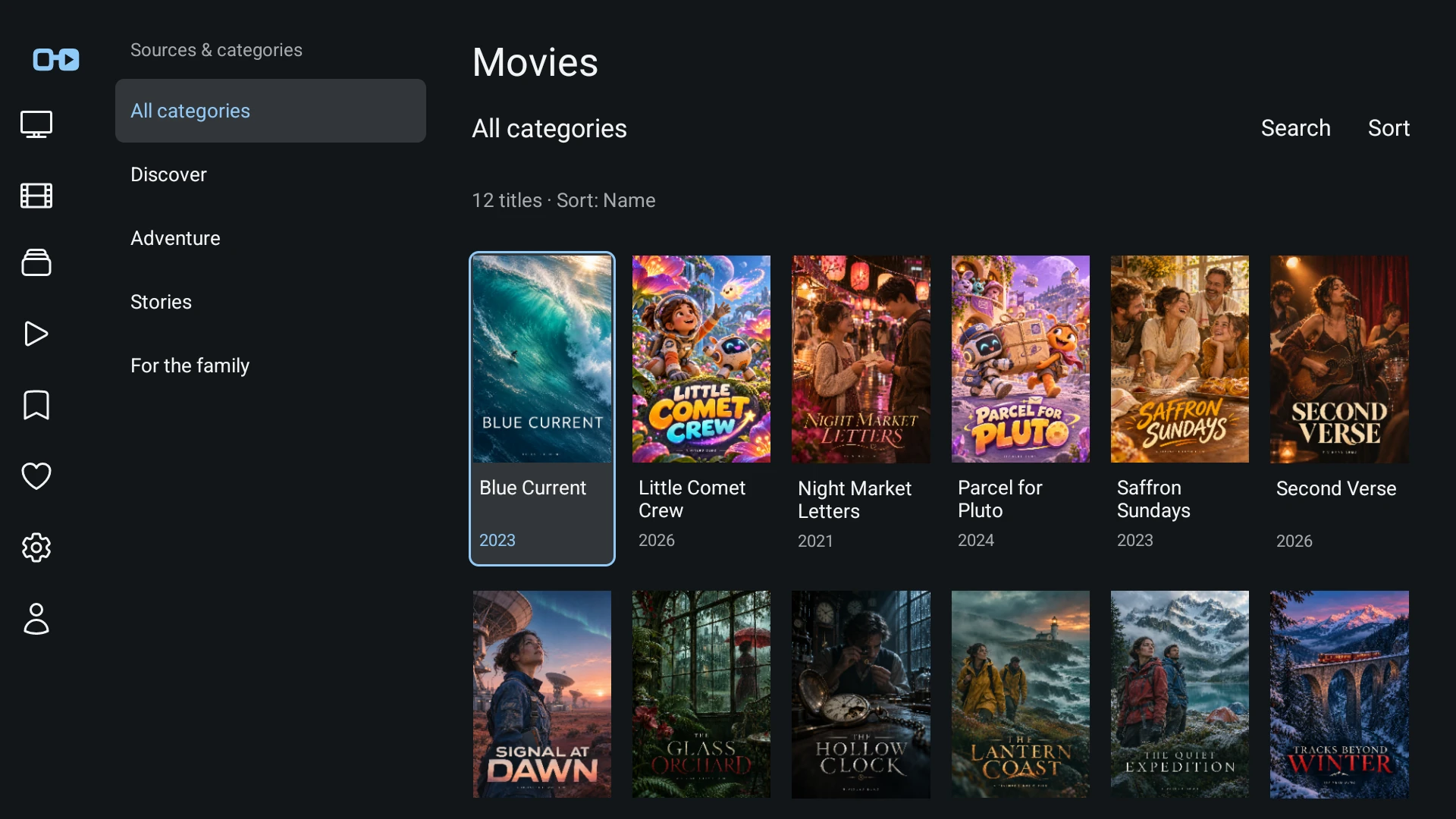
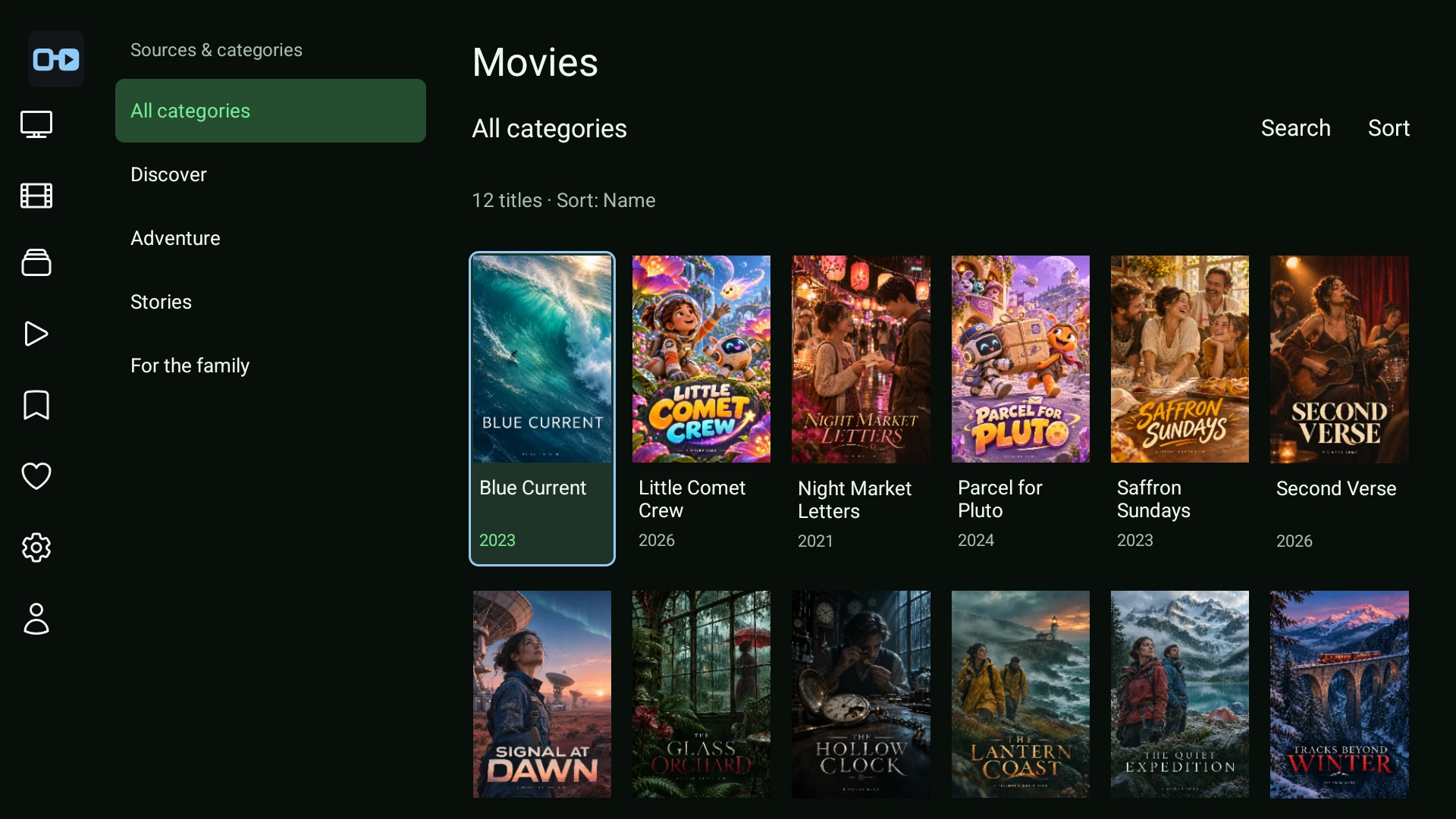
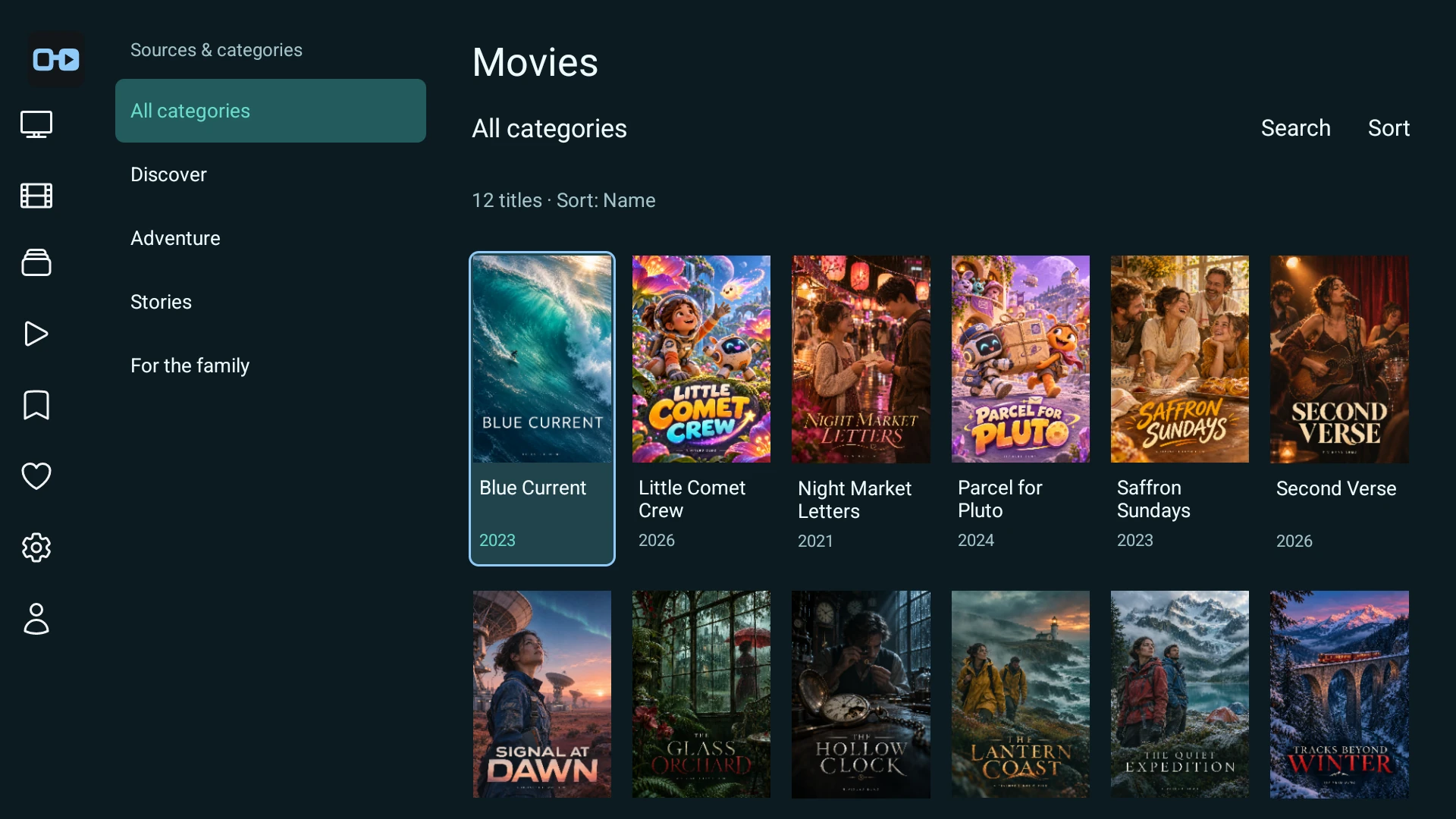
Choose an existing theme, then adjust the available colours to suit your screen. Changing the theme does not change your sources, profile permissions or playback.
These examples show the same real movie-library screen and the same fictional catalogue in Original, Terminal and Ocean. Themes are an explicit choice; an update does not force a different palette.
| Setting and path | What it does | Scope and default |
|---|---|---|
| Text sizeSettings > Appearance | Choose the app text scale. System accessibility scaling still affects layout. | Shared configuration on this device; this label alone is not a claim that Sync carries the key. |
| Guide densitySettings > Appearance | Choose the available comfortable/compact guide window without changing programme identities. | Shared configuration on this device; this label alone is not a claim that Sync carries the key. |
| Program descriptionSettings > Appearance | Show optional programme descriptions and available imagery in guide presentation. | Shared configuration on this device; this label alone is not a claim that Sync carries the key. |
| Program artworkSettings > Appearance | Show optional programme descriptions and available imagery in guide presentation. | Shared configuration on this device; this label alone is not a claim that Sync carries the key. |
| Design & coloursSettings > Appearance | Choose a preset and supported custom colour overrides. Keep focused text readable against the actual selection colour. | Shared configuration on this device; this label alone is not a claim that Sync carries the key. |
| Accessibility for this profileSettings > Appearance | Configure app-side accessibility/profile behaviour; native speech still depends on the operating-system screen reader. | Local to this playback device; do not copy hardware choices between unlike devices. |
| Subtitle appearanceSettings > Appearance | Adjust supported subtitle presentation on this playback device. | Local to this playback device; do not copy hardware choices between unlike devices. |
| Video preview in guideSettings > Appearance | Show or hide the guide video preview. | Shared configuration on this device; this label alone is not a claim that Sync carries the key. |
| Channel numbersSettings > Appearance | Control channel-number and logo presentation; it does not change the provider identity. | Shared configuration on this device; this label alone is not a claim that Sync carries the key. |
| Channel logosSettings > Appearance | Control channel-number and logo presentation; it does not change the provider identity. | Shared configuration on this device; this label alone is not a claim that Sync carries the key. |
| Two-line titlesSettings > Appearance | Allow additional title space where the selected layout supports it. | Shared configuration; initially off. |
| Info display durationSettings > Appearance | Set how long the short player information remains visible. | Shared configuration on this device; this label alone is not a claim that Sync carries the key. |
| Clock in playerSettings > Appearance | Control the corresponding overlay information for the current permitted profile. | Current viewing profile where profiles are enabled. |
| Program description in playerSettings > Appearance | Control the corresponding overlay information for the current permitted profile. | Current viewing profile where profiles are enabled. |
| Recent channels in playerSettings > Appearance | Control the corresponding overlay information for the current permitted profile. | Current viewing profile where profiles are enabled. |
| Source and group in playerSettings > Appearance | Show additional player metadata when supplied. | Shared configuration; initially off. |
| Media information in playerSettings > Appearance | Show additional player metadata when supplied. | Shared configuration; initially off. |
| Player actionsSettings > Appearance | Choose supported control actions and their order. Essential guide access remains available. | Shared configuration on this device; this label alone is not a claim that Sync carries the key. |
| Recent channel countSettings > Appearance | Change the visible recent list length or explicitly clear its history. | Current viewing profile where profiles are enabled. |
| Clear viewing historySettings > Appearance | Change the visible recent list length or explicitly clear its history. | Current viewing profile where profiles are enabled. |
| Always show clock in fullscreenSettings > Appearance | Choose whether and where to display the persistent clock. | Shared configuration; persistent clock initially off. |
| Clock positionSettings > Appearance | Choose whether and where to display the persistent clock. | Shared configuration; persistent clock initially off. |
| Clock sizeSettings > Appearance | Choose whether and where to display the persistent clock. | Shared configuration; persistent clock initially off. |
| Cache logosSettings > Appearance | Control disposable logo caching. Clearing it causes future reloads and does not remove channels. | Local to this playback device; do not copy hardware choices between unlike devices. |
| Clear logo cacheSettings > Appearance | Control disposable logo caching. Clearing it causes future reloads and does not remove channels. | Local to this playback device; do not copy hardware choices between unlike devices. |
| Reset a display sectionSettings > Appearance | Review and reset only the listed appearance settings; this is not an app-data or source reset. | Shared configuration on this device; this label alone is not a claim that Sync carries the key. |
| Show review ratingsSettings > Movies & Series > Library appearance | Show or hide source-supplied review scores in the library and title details. Turning scores off keeps the metadata. A review score is not an age rating and does not change parental controls. | Saved library presentation; initially on. Available on Android TV and touch layouts. |
| Library poster sizeSettings > Movies & Series > Library appearance > Posters per row | Choose Large (5 per row), Balanced (6 per row) or Compact (7 per row). The library uses this density where its layout supports it. Text scale and available screen height affect how many rows are visible. | Saved library presentation. The same appearance form is used on Android TV and touch. |
Playback
The exact value shown in the app is the saved value for this installation. Availability depends on permissions and the source.
| Setting and path | What it does | Scope and default |
|---|---|---|
| Preferred audio languageSettings > Playback | Choose preferred languages; an absent track cannot be created by a language preference. | Current viewing profile where profiles are enabled. |
| Preferred subtitlesSettings > Playback | Choose preferred languages; an absent track cannot be created by a language preference. | Current viewing profile where profiles are enabled. |
| Video bufferSettings > Playback | Choose a supported buffering policy. A larger buffer trades startup time/memory for resilience; it cannot fix a permanently unavailable input. | Local to this playback device; do not copy hardware choices between unlike devices. |
| Aspect ratioSettings > Playback | Choose the supported picture fit/zoom behaviour without changing source encoding. | Local to this playback device; do not copy hardware choices between unlike devices. |
| Reconnect automaticallySettings > Playback | Enable bounded recovery after an unexpected playback interruption. A conscious pause remains a pause. | Shared configuration on this device; this label alone is not a claim that Sync carries the key. |
| Reconnection attemptsSettings > Playback | Choose the allowed attempt count. Exhaustion leads to a visible terminal state and deliberate Retry. | Shared configuration on this device; this label alone is not a claim that Sync carries the key. |
| Detect stalled playbackSettings > Playback | Choose the supported inactivity/stall threshold. A retained last frame is not proof of healthy playback. | Shared configuration on this device; this label alone is not a claim that Sync carries the key. |
| Maximum recovery timeSettings > Playback | Bound the recovery window. Retry is a separate deliberate run. | Shared configuration on this device; this label alone is not a claim that Sync carries the key. |
| Channel switch timingsSettings > Playback | Inspect measured switch phases; this page does not select an upstream provider. | Local to this playback device; do not copy hardware choices between unlike devices. |
| Timeshift enabledSettings > Playback | Enable the local live rewind buffer where supported. This is separate from provider archives. | Local to this playback device; do not copy hardware choices between unlike devices. |
| Timeshift durationSettings > Playback | Choose 30, 60, 90 or 120 minutes as the desired retention limit. Real capacity may be shorter. | Local to this playback device; do not copy hardware choices between unlike devices. |
| Timeshift byte limitSettings > Playback | Bound local buffer storage independently of duration. | Local to this playback device; do not copy hardware choices between unlike devices. |
| Timeshift storageSettings > Playback | Choose an available app-owned storage location. Removing storage can interrupt the buffer. | Local to this playback device; do not copy hardware choices between unlike devices. |
| Buffer capacity/statusSettings > Playback | Inspect received duration, byte usage and measured capacity; an estimate is not a guaranteed recording length. | Local to this playback device; do not copy hardware choices between unlike devices. |
| Audio / subtitles while playingSettings > Playback | Select an actual available track from the current stream. Device media volume remains separate. | Local to this playback device; do not copy hardware choices between unlike devices. |
| Live / seek / pause / stopSettings > Playback | Use only controls supported by the current live, timeshift, archive or finite-media session. | Local to this playback device; do not copy hardware choices between unlike devices. |
| Live rewind bufferSettings > Playback | Open the local live-buffer settings, capacity and status. Buffering is distinct from an archive supplied by the provider. | Device storage and the current live player; no recording rights are implied. |
| Match frame rateSettings > Playback | Choose Only seamless changes or Off. Android receives a frame-rate preference when the display supports a seamless change; resolution is unchanged. Multiview does not request a refresh-rate change. Device and display support determine the result. | Device-local. The initial choice is Only seamless changes; it is not copied to other devices through Sync. |
Remote control
The exact value shown in the app is the saved value for this installation. Availability depends on permissions and the source.
| Setting and path | What it does | Scope and default |
|---|---|---|
| Guide and listsSettings > Remote control | Configure short/long key actions in guide/list context. Back first returns a displaced guide to Now before the next Back opens groups. | Local to this playback device; do not copy hardware choices between unlike devices. |
| Fullscreen playerSettings > Remote control | Choose player-context key behaviour. Opening an overlay changes whether directional keys navigate or zap. | Local to this playback device; do not copy hardware choices between unlike devices. |
| Movies and series · gridSettings > Remote control | Configure browsing-context actions separately from player controls. | Local to this playback device; do not copy hardware choices between unlike devices. |
| Movies and series · playerSettings > Remote control | Configure finite-player key actions without applying TV-only assumptions to touch. | Local to this playback device; do not copy hardware choices between unlike devices. |
Channels and lists
The exact value shown in the app is the saved value for this installation. Availability depends on permissions and the source.
| Setting and path | What it does | Scope and default |
|---|---|---|
| Manage channelsSettings > Channels and lists | Review source channels, visibility, names, ordering and permitted management actions. | Selected source or its library; personal selection and playback remain separate. |
| Manage groupsSettings > Channels and lists | Enable or hide groups without re-creating the source. Child-profile rules remain additional restrictions. | Selected source or its library; personal selection and playback remain separate. |
| Sort orderSettings > Channels and lists | Choose channel number, name or server order. Display order is separate from stable channel identity. | Selected source or its library; personal selection and playback remain separate. |
| All favoritesSettings > Channels and lists | Use the current profile favourite list. Combined and per-source views are only shown when meaningful. | Current viewing profile where profiles are enabled. |
| Recently watchedSettings > Channels and lists | Browse the permitted recent channels; a recent item does not override a restriction. | Current viewing profile where profiles are enabled. |
| Custom listsSettings > Channels and lists | Create and manage personal collections without changing source credentials. | Current viewing profile where profiles are enabled. |
Profiles
The exact value shown in the app is the saved value for this installation. Availability depends on permissions and the source.
| Setting and path | What it does | Scope and default |
|---|---|---|
| Manage profilesSettings > Profiles | Create the administrator and additional profiles. Profile display names are user-chosen. | Shared configuration on this device; this label alone is not a claim that Sync carries the key. |
| Avatar / custom pictureSettings > Profiles | Choose the provided avatar or a supported household image. It does not change the account identity. | Current viewing profile where profiles are enabled. |
| Profile PINSettings > Profiles | Optionally protect entering a profile. Keep administrator and viewing-profile PIN purposes distinct. | Current viewing profile where profiles are enabled. |
| Child profile / age limitSettings > Profiles | Set VOD access limits. Unknown age ratings remain restricted unless the administrator approves them. | Current viewing profile where profiles are enabled. |
| Allowed channels / groupsSettings > Profiles | Configure the profile channel access and exclusions. Search, history and lists must obey the same policy. | Current viewing profile where profiles are enabled. |
| Settings accessSettings > Profiles | Choose none, personal or administrator access as supported; a hidden button is not the security boundary. | Current viewing profile where profiles are enabled. |
| Startup profile on this deviceSettings > Profiles | Choose device-specific automatic profile entry and the supported PIN-protected exit. | Local to this playback device; do not copy hardware choices between unlike devices. |
| Switch profileSettings > Profiles | Use the protected switch route rather than bypassing the configured exit PIN. | Current viewing profile where profiles are enabled. |
| Native accessibilitySettings > Profiles | Use operating-system accessibility alongside the app labels. TiviNerd does not silently enable a system speech service. | Local to this playback device; do not copy hardware choices between unlike devices. |
Movies and series
The exact value shown in the app is the saved value for this installation. Availability depends on permissions and the source.
| Setting and path | What it does | Scope and default |
|---|---|---|
| Library informationSettings > Movies and series | Inspect catalogue completion, imported/visible counts and selected filters before treating a small visible count as missing data. | Selected source or its library; personal selection and playback remain separate. |
| Episode playbackSettings > Movies and series | Choose the progress threshold for the next-episode action and supported autoplay behaviour. The percentage belongs in settings, not as on-picture instructional text. | Current viewing profile where profiles are enabled. |
| Library appearanceSettings > Movies and series | Adjust supported film/series card presentation without changing the local catalogue. | Current viewing profile where profiles are enabled. |
| Audio and subtitle preferencesSettings > Movies and series | Set finite-media track preferences separately from the device volume. | Current viewing profile where profiles are enabled. |
| My listsSettings > Movies and series | Manage watchlist and continue-watching choices under the current profile. | Current viewing profile where profiles are enabled. |
| Manage movie categoriesSettings > Movies and series | Enable or hide categories separately for films and series; changes remain associated with the source. | Selected source or its library; personal selection and playback remain separate. |
| Manage series categoriesSettings > Movies and series | Enable or hide categories separately for films and series; changes remain associated with the source. | Selected source or its library; personal selection and playback remain separate. |
| Hidden and locked titlesSettings > Movies and series | Review individually hidden content. Re-enabling a title does not override profile protection. | Selected source or its library; personal selection and playback remain separate. |
| Content protectionSettings > Movies and series | Configure household protection and unknown-rating handling. | Administrator/household policy. |
| Refresh catalogueSettings > Movies and series | Refresh a chosen library or set its source update behaviour without a full first setup. | Selected source or its library; personal selection and playback remain separate. |
| Library update intervalSettings > Movies and series | Refresh a chosen library or set its source update behaviour without a full first setup. | Selected source or its library; personal selection and playback remain separate. |
| Poster cacheSettings > Movies and series | Inspect or clear disposable image data. Missing artwork uses a labelled placeholder; it is not a missing title. | Local to this playback device; do not copy hardware choices between unlike devices. |
Backup and Household Sync
The exact value shown in the app is the saved value for this installation. Availability depends on permissions and the source.
| Setting and path | What it does | Scope and default |
|---|---|---|
| Create backupSettings > Backup and Household Sync | Export the supported encrypted configuration and keep its recovery information private. | Administrator; portable configuration, not media caches. |
| Restore backupSettings > Backup and Household Sync | Inspect what will be replaced. Never use an older test snapshot over newer personal data. | Administrator; explicit replacement operation. |
| Household syncSettings > Backup and Household Sync | Connect, enrol and inspect synchronisation with the configured self-hosted service. | Household administrator and enrolled device. |
| What is shared across devices?Settings > Backup and Household Sync | Review which settings are portable and which remain device-local. Large EPG/catalogue/image caches are not synchronised. | Shared configuration on this device; this label alone is not a claim that Sync carries the key. |
| Dashboard source/profile managementSettings > Backup and Household Sync | Manage supported shared definitions and policies through the authenticated Sync dashboard. | Sync administrator; each app downloads its own source content. |
| Connected devices / revocationSettings > Backup and Household Sync | Review enrolment and remove a device deliberately. Planned billing device limits are distinct from provider streaming slots. | Household/server administration. |
| Google DriveSettings > Backup and Household Sync | Review the prepared route and missing OAuth/project prerequisites. | Preparation only; no completed cloud login is claimed. |
Network, storage and About
The exact value shown in the app is the saved value for this installation. Availability depends on permissions and the source.
| Setting and path | What it does | Scope and default |
|---|---|---|
| Exit IP / countrySettings > Network, storage and About | Display the measured outgoing IP where available. The country does not assert that a VPN is on or off. | Selected device or Dispatcharr server route, explicitly labelled. |
| Refresh addressSettings > Network, storage and About | Request a fresh measurement or choose its compact menu presentation. | Shared configuration on this device; this label alone is not a claim that Sync carries the key. |
| Show exit address in menuSettings > Network, storage and About | Request a fresh measurement or choose its compact menu presentation. | Shared configuration on this device; this label alone is not a claim that Sync carries the key. |
| Storage and cacheSettings > Network, storage and About | Inspect local catalogue/cache/buffer/recording storage before deleting anything. | Local to this playback device; do not copy hardware choices between unlike devices. |
| Clear disposable cacheSettings > Network, storage and About | Remove only the described disposable data. This is not source deletion or a factory reset. | Local to this playback device; do not copy hardware choices between unlike devices. |
| VersionSettings > Network, storage and About | Read the running version and build, not only the download filename. | Local to this playback device; do not copy hardware choices between unlike devices. |
| BuildSettings > Network, storage and About | Read the running version and build, not only the download filename. | Local to this playback device; do not copy hardware choices between unlike devices. |
| App updatesSettings > Network, storage and About | Inspect and download a permitted verified update, then follow the normal Android installer. | Local to this playback device; do not copy hardware choices between unlike devices. |
| DiagnosticsSettings > Network, storage and About | Review and export a report with the reproduction step and support reference. No automatic GitHub/Discord upload is promised. | Local to this playback device; do not copy hardware choices between unlike devices. |
| Report a problemSettings > Network, storage and About | Review and export a report with the reproduction step and support reference. No automatic GitHub/Discord upload is promised. | Local to this playback device; do not copy hardware choices between unlike devices. |
| Open-source licensesSettings > Network, storage and About | Read notices for included third-party components. | Packaged read-only notices. |
| Movie and series cataloguesSettings > Storage and cache | Inspect durable saved library inventory and its size. This is not disposable poster cache. | Device-local encrypted catalogue. |
| Saved programme metadataSettings > Storage and cache | Inspect stored programme-guide metadata separately from channel sources. | Device-local guide data. |
| Temporary title detailsSettings > Storage and cache | Inspect disposable extra title information; removing it does not remove the base catalogue. | Device-local temporary metadata. |
| Poster memorySettings > Storage and cache | Inspect the bounded decoded-artwork memory cache. | Current device process. |
| Saved postersSettings > Storage and cache | Inspect disposable on-disk artwork. | Device-local artwork cache. |
| Local recordingsSettings > Storage and cache | Inspect locally saved recordings and storage. Clearing an artwork cache does not delete recordings. | Device-local recording storage. |
| Available device storageSettings > Storage and cache | Show free storage reported by Android for this device; a storage error alone does not prove the disk is full. | Current device observation. |
| Clear poster cache and memorySettings > Storage and cache | Remove disposable artwork from memory and disk. Poster loading resumes on demand; profiles, source choices and the base catalogue remain. | Device-local explicit action. |
| Clear temporary title detailsSettings > Storage and cache | Remove disposable extra title details, preserving the saved catalogue and personal viewing state. | Device-local explicit action. |